
Kikibet SSL Encryption and Data Protection
When you play online, your personal and financial data is your most valuable asset. Understanding how a platform like Kikibet casino protects this information is not just reassuring—it’s essential. This guide breaks down the technical security measures, specifically SSL encryption, in practical terms, explaining what it is, how it works for you, and how you can verify it’s active.
What SSL Encryption Means for Your Kikibet Account
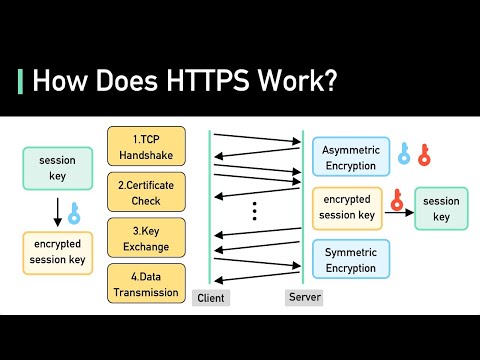
SSL (Secure Sockets Layer) is the standard technology for creating an encrypted link between a web server (Kikibet’s servers) and your browser. This secure tunnel ensures that all data passed between the two remains private and integral. When you log into your account, make a deposit, or submit any personal details, SSL encryption scrambles this information. It becomes an unreadable jumble to anyone who might intercept it, only to be decrypted by the intended server. This is the fundamental defense against data theft and man-in-the-middle attacks.
How to Verify Kikibet’s SSL Certificate in Your Browser
You don’t need to be a tech expert to confirm a site is secure. Here is a simple step-by-step process to verify Kikibet’s SSL protection yourself:
- Open your web browser and navigate to the Kikibet website.
- Look at the address bar at the top of your window. You should see a closed padlock icon to the left of the website’s URL.
- Click on this padlock icon. A small dropdown will appear stating “Connection is secure”.
- Click on “Certificate is valid” to view the SSL certificate details. This shows the certificate was issued by a trusted authority and is active.
If you see this padlock, you can be confident your connection is encrypted. Never enter any information on a site that does not display this symbol.
Beyond SSL: Kikibet’s Additional Data Protection Layers
While SSL secures data in transit, Kikibet employs other critical measures to protect your data at rest. This includes robust firewalls to prevent unauthorized access to their internal networks and secure databases where your information is stored. These systems are routinely audited and tested for vulnerabilities. Furthermore, the platform’s adherence to strict privacy policies means your data is never sold or shared with third parties for marketing purposes without your consent. This multi-layered approach ensures comprehensive protection for your Kikibet bonus details and personal information.
Understanding Data Kikibet Collects and Why
To operate a secure and compliant platform, Kikibet must collect certain user data. This process, known as KYC (Know Your Customer), is a standard regulatory requirement. The typical documents required and their purpose are outlined below.
| Document Type | Primary Purpose | Typical Verification Time |
|---|---|---|
| Government-Issued Photo ID (Passport, Driver’s License) | To verify your identity and age (must be 18+) | 24-48 hours |
| Proof of Address (Utility Bill, Bank Statement) | To confirm your country of residence for legal compliance | 24-48 hours |
| Payment Method Verification (Card photo, e-wallet screenshot) | To prevent fraud and confirm ownership of the deposit method | 12-24 hours |
This process is crucial for preventing fraud, money laundering, and underage gambling, ultimately making the platform safer for everyone.
Best Practices for Protecting Your Own Data
Security is a shared responsibility. While Kikibet provides powerful tools, you must also take precautions. First, always create a strong, unique password for your account that you don’t use elsewhere. Enable two-factor authentication (2FA) if it is offered, as this adds a critical second layer of security to your login. Be wary of phishing emails pretending to be from support; legitimate services like Kikibet will never ask for your password via email. Finally, always ensure you are on the correct website before entering any details, especially when claiming a Kikibet no deposit offer or entering a Kikibet promo code. For the latest promotions, always go to the official source like KikiBet.
Resolving Common SSL and Access Issues
Occasionally, you might encounter a browser warning about a site’s connection not being private. This is often not a fault with Kikibet’s encryption but a local issue. Common causes and fixes include:
- Your computer’s date and time are incorrect: SSL certificates are time-sensitive. Ensure your system clock is set correctly.
- Browser cache is corrupted: Clear your browser’s cached images and files.
- Outdated browser: Update your browser to the latest version to ensure it supports modern security protocols.
- Network issues: If you are on a public Wi-Fi, the network itself might be causing the warning. Avoid entering sensitive data on public networks.
If problems persist, contacting Kikibet’s customer support is the best course of action. By understanding and utilizing these security features, you can enjoy your experience, including any Kikibet free spins, with greater peace of mind.